Development User Stories: From Idea to MVP Scope
Learn how to write effective development user stories for your MVP. A step-by-step guide for non-technical founders to scope, refine, and build with clarity.
You probably have some version of this problem right now.
You can explain the product in a pitch deck. You can describe the big idea in a few sentences. You may even have a long Notion page full of features. But the second you try to turn that vision into something a small dev team can build, everything gets fuzzy.
Founders usually swing between two bad extremes. One is staying too high-level: “We need onboarding, profiles, payments, AI recommendations.” The other is going too low-level: “Use a dropdown here, connect this API there, add a toggle on this screen.” Neither gives a product team what it needs to build a sharp MVP.
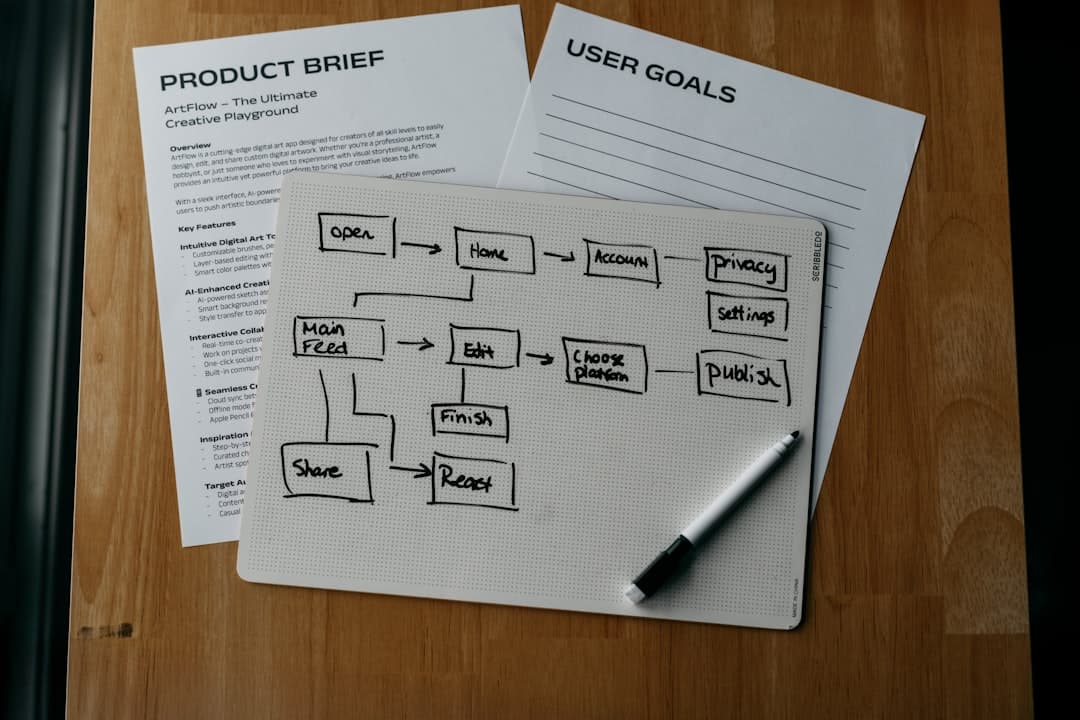
That is where development user stories matter. They turn founder intent into buildable work without forcing you to speak like an engineer. They help a small team understand who the feature is for, what they are trying to do, and how to tell when the work is done. For lean teams, that is the difference between a focused MVP and a messy first release.
Table of Contents
- Why Your MVP Needs User Stories Not Just a Feature List
- Crafting Your First User Story with the 3 C's
- Writing Acceptance Criteria That Prevent Rework
- How to Refine and Split User Stories
- From Backlog to Launch A Sample Workflow
- Stories Are Conversations Not Contracts
Why Your MVP Needs User Stories Not Just a Feature List
A feature list sounds useful until real trade-offs show up.
“User profiles” looks clear on paper. It is not. Does that mean sign-up, profile photo upload, editing bio, privacy settings, public profile pages, and admin moderation? Or does it mean the smallest possible version: name, avatar, and one editable field? A feature list hides those decisions. A user story forces them into the open.

A good user story links the feature to a user outcome. That changes the conversation from “what should exist in the app” to “what problem should the app solve first.” For an MVP, that shift matters more than almost anything else. Early products fail less often from missing polish than from solving the wrong problem in the wrong order.
Feature lists describe inventory
A feature list is basically a shopping list. It tells your team what items are floating around in your head.
That can help during early brainstorming. It is weak once design and engineering start. Lists do not explain priority well, and they do not explain value at all.
A founder might write:
- Messaging
- Search
- Profiles
- Notifications
That is not scope. It is a category dump.
Development user stories describe value
A user story adds intent. It gives the team room to make smart implementation choices without losing the purpose of the feature.
Compare these two inputs:
- Feature list item: Search
- User story: As a buyer, I want to search listings by keyword so that I can find relevant products quickly
The second one is better because it tells the team who matters, what action matters, and why that action matters. Designers can shape the flow. Developers can choose the simplest implementation that supports the goal. Founders can judge whether the work supports validation.
Tip: If a requirement cannot answer “who is this for?” and “why does it matter?”, it is usually not ready for MVP scope.
This is also where many early teams get stuck. Reports indicate that many startups struggle with story refinement due to founder inexperience, highlighting the need for founder-friendly workflows rather than enterprise process overhead (NNGroup on user story mapping).
Why this matters for a non-technical founder
You do not need to write perfect Agile artifacts. You need a shared language with the people building your product.
That language should help you:
- Prioritize ruthlessly: Put user value ahead of founder wish lists.
- Reduce waste: Cut features that sound impressive but do not support the first release.
- Invite better solutions: Let the team suggest simpler approaches than the one you imagined.
- Avoid false certainty: Stay focused on outcomes, not premature technical detail.
If you are still trying to turn a broad idea into a buildable first version, this guide on what to build first in an MVP pairs well with the story process.
Crafting Your First User Story with the 3 C's
The simplest useful format is still the best one:
As a [user], I want to [action], so that [benefit].
That sentence is not corporate theatre. It is a compression tool. It forces clarity.

If you are building a marketplace MVP, a rough story might be:
As a seller, I want to upload a product photo, so that buyers can trust what I am listing.
That is already better than “photo upload feature.” It gives your team context. But the sentence alone is not the whole practice.
The sentence is only the start
The 3 C's are the useful part.
Ron Jeffries coined the 3 C's framework in 2001: Card, Conversation, Confirmation, and it pushed requirements away from rigid specs and toward collaboration. It is now widely adopted by many large companies using Agile methodologies (Mountain Goat Software on user stories).
Here is what each part means in practice.
Card
The Card is the short written version of the story. It is a reminder, not a novel.
Keep it brief. If the story starts turning into a mini product requirements document, stop. That usually means you are mixing several decisions together.
Examples:
- Clear: As a new user, I want to sign up with email so that I can save my preferences
- Weak: Build registration with email verification, password rules, account creation flow, welcome modal, onboarding survey, and referral entry
The second version is not a story. It is a bundle.
Conversation
The Conversation is where significant product work happens. Founder, designer, and developer talk through the intent, the edge cases, and the constraints.
For founders, this is the part that matters most. You do not need to hand over a perfect spec. You do need to explain the user problem clearly enough that the team can challenge weak assumptions.
A practical conversation sounds like this:
- Founder: “I need users to onboard fast.”
- Designer: “Who is signing up first. Buyer, seller, or both?”
- Developer: “Do we need social login now, or is email enough for launch?”
- Founder: “Email is enough. I care more about reducing drop-off than offering every option.”
That exchange often saves weeks of overbuilding.
Confirmation
The Confirmation is how everyone agrees what “done” means.
Without confirmation, teams fill gaps with assumptions. Founders then review a feature and say, “That is not what I meant.” Engineers usually did exactly what they thought was right. The problem was not execution. The problem was an unclear target.
Key takeaway: The story creates alignment only when the team agrees on the user outcome and the test for success.
A practical template for founders
When we help founders shape development user stories, we strip the process down to a few prompts:
- Who is this for
- What are they trying to do
- Why does it matter to them
- What must be true for us to call this done
That fourth prompt is where many first-time founders hesitate. Good. It means you are moving from idea mode into product mode.
A few examples:
- As a busy parent, I want to reorder a past purchase so that I can check out faster
- As a recruiter, I want to filter candidates by role so that I can review the right applicants
- As a first-time user, I want to skip setup and browse immediately so that I can understand the product before committing
Notice what is missing. No database language. No API instructions. No UI prescription unless it is essential.
That is the point. A story should describe the need, not trap the team inside one implementation.
Writing Acceptance Criteria That Prevent Rework
Most bad product feedback loops start with a sentence that sounded clear at the time.
“Users should be able to search.” “Checkout should feel simple.” “The dashboard should show useful insights.”
Everyone nods. Then the build arrives. Then the founder spots missing behavior. Then the team reworks it. That cycle is common because the story had intent, but not enough definition.

Vague acceptance criteria are a leading cause of project friction and can contribute to rework rates as high as 35% in early sprints (Platinum Edge on weaker stories).
Acceptance criteria are your defense against that mess. They define the conditions that must be true before a story is done.
What acceptance criteria should do
They should remove ambiguity, not add paperwork.
For a non-technical founder, acceptance criteria are the practical checklist you can review with your team before work starts. They turn “build search” into a shared agreement.
A weak story:
As a user, I want to search listings so that I can find what I need.
A stronger story with criteria:
As a buyer, I want to search listings by keyword so that I can find relevant products quickly.
Acceptance criteria:
- Keyword search works: Users can type a term and see matching listings
- Empty state appears: If no matches exist, the interface shows a clear no-results message
- Result action is obvious: Users can open a listing from the results view
- Basic responsiveness holds: Search works on mobile and desktop layouts
That list is not fancy. It is useful.
Use Given When Then in plain English
A simple way to write criteria is Given / When / Then.
It sounds technical at first. It is not. It just means:
- Given: the starting situation
- When: the user does something
- Then: the expected result happens
Example:
- Given a buyer is on the listings page
- When they enter a keyword and submit a search
- Then the system shows matching listings that include that keyword
This format is helpful because it reveals hidden decisions. If nobody can write the “Then” clearly, the team probably does not agree on the expected behavior.
Here is a useful walkthrough before you write criteria:
What founders usually miss
Founders often define the happy path and forget the awkward parts.
That creates expensive revisions late in the sprint. Before approving a story, ask about:
- Empty states: What happens when there is no data?
- Errors: What does the user see if something fails?
- Permissions: Who can do this and who cannot?
- Device context: Does this need to work differently on mobile?
- Completion signal: How does the user know the action succeeded?
Tip: If a feature review often ends with “oh, I assumed it would also do X,” your acceptance criteria are too thin.
For teams trying to tighten release quality, this article on quality control automation is useful background. It shows why clear expectations upstream make testing and launch much smoother downstream.
Keep criteria specific, not bloated
Do not turn every story into a legal document.
You need enough detail to remove confusion, not every possible future rule. If a criterion belongs to a later phase, keep it out. For MVPs, restraint is a product skill.
A good test is simple: could a designer, developer, and founder all read the criteria and reach the same conclusion about whether the story is complete? If yes, the criteria are doing their job.
How to Refine and Split User Stories
Founders naturally think in chunks. “Profiles.” “Subscriptions.” “Analytics.” “AI assistant.”
Teams cannot ship chunks. They ship small, testable slices.
That is where story refinement matters. The goal is not to atomize everything into tiny tasks for the sake of process. The goal is to cut a big idea into pieces small enough to build, review, and learn from quickly.
Dave Farley’s Continuous Delivery analysis, cited by Airfocus, shows that teams working with small, focused stories, often less than a day’s effort, can get up to 5 times more feedback loops (Airfocus on user story mistakes). More feedback loops means less time betting on the wrong thing.
The INVEST Checklist for Ready Stories
The easiest filter for development user stories is INVEST.
| Letter | Stands For | What to Ask |
|---|---|---|
| I | Independent | Can this be built and tested without waiting on three other stories first? |
| N | Negotiable | Are we still talking about the outcome, not locking in one exact implementation? |
| V | Valuable | Does a real user benefit from this, or is it internal busywork disguised as product scope? |
| E | Estimable | Can the team reasonably judge the effort, or are there too many unknowns? |
| S | Small | Can this fit cleanly inside one sprint, preferably as a tight slice? |
| T | Testable | Can we clearly verify whether it works? |
A story does not need to be perfect on every letter. It should not fail badly on any of them.
How to split a story without breaking the user value
Take a common epic: User profiles.
That is too broad for one story. It contains several separate user outcomes. A better split might look like this:
- Account creation: As a new user, I want to create an account with email so that I can access the product later
- Basic identity: As a user, I want to add my name and profile photo so that others can recognize me
- Public visibility: As a user, I want a public profile page so that others can view my basic information
- Editing: As a user, I want to update my profile details so that my information stays current
Each of those can be designed, built, tested, and prioritized separately.
That matters because not every slice belongs in version one. If your MVP only needs identity and sign-in, public profiles may wait. Splitting stories reveals that choice.
Good splitting follows the user journey
A practical way to split a large feature is to follow the order in which a user experiences value.
For example, “messaging” might split into:
- Start a conversation
- Send one message
- View message history
- Receive a new message alert
That sequence is useful because it reflects an actual workflow, not an internal system architecture. Founders often over-scope by asking for every supporting feature at once. A lean team should push back and ask: what is the smallest usable path?
Key takeaway: If a story contains multiple “and” statements, you probably have more than one story.
A few signs a story still needs refinement:
- It hides technical uncertainty: The team cannot estimate it confidently.
- It bundles setup with value delivery: Admin logic, permissions, and UI all sit in one item.
- It depends on many parallel decisions: Design, data model, and edge cases are all unresolved.
- It is hard to demo: Nobody can point to a simple before-and-after outcome.
Refinement is not bureaucracy. It is how a team keeps the MVP learnable. Small stories let you release, review, and adjust without rebuilding half the roadmap.
From Backlog to Launch A Sample Workflow
A backlog should not feel like a graveyard of ideas.
For a founder working with a lean product pod, it should act like a sequence of decisions. Each story should earn its place by helping the team reach a launchable version of the product.

A practical workflow is much simpler than most founders expect. You do not need layers of ceremony. You need a rhythm.
What a founder brings into the room
Founders should start with raw inputs, not polished specifications.
Useful inputs include:
- User problems: What is frustrating, slow, risky, or expensive in the current behavior?
- Core journeys: What must a user do from first visit to successful outcome?
- Business bets: What assumptions are you trying to validate with the MVP?
- Priority signals: What absolutely needs to exist for a demo, pilot, or launch?
That material becomes epics first. Then the team turns those epics into stories.
For example, a founder may arrive with three epics:
- Onboard a new user
- Let users book a session
- Let users pay
That is enough to start a real scoping conversation.
How a lean pod turns stories into a release plan
From there, the workflow usually looks like this:
-
Story writing session Founder, designer, and developer turn each epic into draft stories with clear user outcomes.
-
Acceptance criteria review The team sharpens the edges. What must happen, what can wait, and what counts as done?
-
Rough sizing The pod uses simple relative sizing such as T-shirt sizes to spot risky or oversized stories.
-
Backlog prioritization The founder chooses based on value, urgency, and validation need, not just personal preference.
-
Sprint grouping Stories are grouped into a realistic sprint plan with enough room for testing and adjustment.
One benchmark is especially useful here. Agile teams optimally complete 5 to 15 user stories per sprint, which helps with capacity planning and reduces overload (LeadingAgile on stories per sprint).
That does not mean your team should chase a story count. It means a sprint should contain a manageable set of complete, testable outcomes. If the list is much larger, the stories are often too tiny, too vague, or too bundled.
What this looks like in practice
A founder building a service marketplace MVP might end up with a first release plan like this:
| Sprint focus | Likely story themes |
|---|---|
| Sprint 1 | Sign-up, login, profile basics |
| Sprint 2 | Search, listing detail, booking request |
| Sprint 3 | Payment flow, booking confirmation, email notifications |
| Sprint 4 | Polish, bug fixes, admin basics, launch prep |
That example is intentionally plain. Good MVP planning usually is.
What matters is that every story supports the release path. If a story does not help the product get used, tested, sold, or demonstrated, it probably does not belong in the first launch.
If you want to see how a lean team structures this work in practice, how we work gives a useful reference point for the founder-pod model.
Tip: The backlog is not a promise to build everything. It is a ranked list of current bets.
Stories Are Conversations Not Contracts
A user story stops being useful the moment people treat it like a frozen document.
That usually happens when founders want certainty before the team has learned enough, or when teams hide behind the written ticket instead of discussing trade-offs. Both lead to brittle decisions.
The point of development user stories is shared understanding. The sentence matters. The criteria matter. The conversation matters most.
What good collaboration looks like
A healthy founder-team exchange sounds like this:
- The founder explains the user problem and the business priority.
- The designer questions the flow and trims complexity.
- The developer suggests a simpler implementation path.
- The team updates the story based on what they learned.
That is not scope drift. That is the process working.
A bad pattern is the opposite. The founder prescribes the interface in detail. The team executes precisely as instructed. Everyone discovers too late that the feature does not solve the original problem. The team built the ticket correctly and still lost time.
Stories work best when you hold onto four rules:
- Lead with user value: Start from the person and the problem.
- Define done clearly: Use acceptance criteria to remove avoidable confusion.
- Keep stories small: Small slices are easier to build, test, and change.
- Reprioritize aggressively: Early-stage products need sequence, not completeness.
Key takeaway: The best stories leave room for the team’s expertise while staying firm on the user outcome.
If you are a non-technical founder, this should feel like good news. You do not need to become a pseudo-engineer to lead product development well. You need to be the clearest voice in the room on user pain, business priority, and what success looks like.
That is enough to guide an excellent MVP.
If you want a hands-on team to turn rough ideas into sharp development user stories, product scope, and a launch-ready MVP, talk to bytelabs.. We work directly with non-technical founders as a designer-developer duo, helping translate vision into clear product decisions, fast execution, and a first release that stays focused on what users need.