Human-AI Handoffs That Don’t Break User Trust
Most AI products fail at the handoff. Here’s how to design escalation patterns and micro-interactions that keep users moving.

Bad AI handoffs destroy trust faster than wrong AI answers do.
Most founders obsess over model quality and ignore the moment when the system needs help. That is a mistake. Users will forgive an AI that asks for backup. They will not forgive an AI that stalls, loops, or silently fails when the task clearly needs a human.
Table of Contents
- Why the handoff matters more than model quality
- The micro-interactions every AI product needs
- Four escalation patterns that actually work
- How to decide when AI should escalate
- What a good handoff looks like in the product
- What to do next
Why the handoff matters more than model quality
A strong handoff design can make a mediocre model feel reliable. A weak handoff design can make a great model feel broken.
That sounds backwards, but it is true for one simple reason: users judge systems by whether they keep momentum. They care less about whether the AI got 86% or 91% accuracy in a benchmark and more about whether the product helped them finish the job without confusion.
88% of users say good customer service makes them more likely to purchase again. In AI products, the handoff is customer service. It is the moment where the system proves it knows its limits.
67% of consumers have used chatbots for support in the past year. That means users already know the pattern. They expect automation first, but they also expect a clean route to a person when the automation starts missing context.
At bytelabs, we have seen this directly in AI builds. On Utkrusht.ai, the technical challenge was streaming LLM responses without blocking the UI thread. But the product challenge was just as important: users needed clear feedback that the system was still working, and they needed a recovery path when generation went off track. We did not treat that as a support feature. We treated it as core UX.
The same principle shows up in workflow tools. On Harmony.ai, the expensive part was not just token usage. It was failed or partial runs in multi-step tool-calling chains. We reduced costs by caching intermediate outputs, but that only mattered because the UX made it obvious when the system could reuse prior work, when it needed confirmation, and when a human should step in to approve the next action.
The best AI products do not pretend to be autonomous. They make escalation feel like progress, not failure.
This is where many teams get stuck. They treat escalation as an edge case. It is not. It is a primary interaction in any serious AI workflow.
If you are still defining the product, read Mvp Scope Example What To Build First. Your handoff logic belongs in MVP scope from day one, not in a “later” bucket.
The micro-interactions every AI product needs
Human-AI handoff quality is mostly made of tiny decisions. The difference between trust and abandonment is often a line of copy, a timing choice, or one missing status indicator.
You need five micro-interactions in place before you worry about fancy autonomy.
1. A visible confidence state
Never leave users guessing whether the system is certain, checking, or stuck.
Good examples:
- “Draft ready — please review before sending” tells the user the AI has produced something useful but should not act alone.
- “I’m not confident about this answer. Want me to bring in a specialist?” turns uncertainty into a controlled next step.
- “Fetching account details before I respond” reassures the user that silence is progress, not failure.
Bad examples:
- “Thinking…” for 12 seconds tells the user nothing and erodes trust with every extra second.
- A spinner with no context feels broken, especially in high-stakes tasks like billing, healthcare, or legal workflows.
Nielsen Norman Group has repeatedly shown that system visibility is a core usability principle because users need timely feedback to understand state and next action. That principle matters even more in AI because the system is non-deterministic. If you want deeper trust patterns around this, our post on Ux Patterns For Ai Explainability And Trust goes further.
2. A graceful stop-and-recover state
AI should fail forward.
That means when the system cannot complete a task, the interface should preserve:
- The user’s original input, so they do not need to repeat themselves.
- The AI’s partial work, so users can salvage useful output instead of restarting from zero.
- A next step, so the flow does not dead-end.
This matters more than teams think. In onboarding and support flows, restarts kill completion. On BeYourSexy.ai, the cold-start challenge was new users with no history. We solved that technically with embedding-based similarity from onboarding answers, but the product lesson was broader: when context is thin, the UI must make every answer feel cumulative. The same applies to escalation. Never throw away context just because the AI needs help.
3. Explicit ownership transfer
A handoff is not complete when the AI says, “Let me connect you.” It is complete when the user knows who owns the task now.
Use microcopy that answers three questions:
- Who has the task now?
- What context has been passed along?
- When should the user expect the next update?
A simple pattern works:
- “I’ve passed your last 6 messages, billing ID, and failed charge details to Maya from support. She’ll reply in under 10 minutes.”
That line does three jobs at once. It confirms transfer, shows retained context, and sets a time expectation.
4. Review-before-action checkpoints
If the AI is about to send, submit, publish, or trigger something irreversible, force a checkpoint.
This is not friction. It is the right friction.
We use this rule aggressively in AI workflow design:
- Low-risk actions can auto-run.
- Medium-risk actions should ask for confirmation.
- High-risk actions should require human review before execution.
That framework is practical because it maps directly to product flows and backend permissions.
5. A short explanation for why the handoff happened
Users trust escalation more when they understand the trigger.
Use one sentence:
- “This request needs account-specific verification.”
- “I found two valid interpretations and don’t want to make the wrong change.”
- “This task affects live customer data, so a human needs to approve it.”
That explanation prevents the user from assuming the product is incompetent. It frames the handoff as responsible behavior.
Four escalation patterns that actually work
Most AI products need only four escalation patterns. If you cannot name which one you are using in each flow, your product is improvising.
| Pattern | Best for | Risk level | UX rule |
|---|---|---|---|
| Auto-resolve | Repetitive, reversible tasks like FAQ answers or formatting | Low | Show result fast and make correction easy |
| Suggest-and-confirm | Drafts, recommendations, or settings changes | Medium | Present a clear recommendation and ask for one-tap approval |
| Human-review-before-send | Outreach, financial actions, policy-sensitive outputs | High | Let AI prepare the work, but block execution until a human approves |
| Full human takeover | Complex edge cases, emotional support, compliance issues | Very high | Preserve context and make ownership transfer explicit |
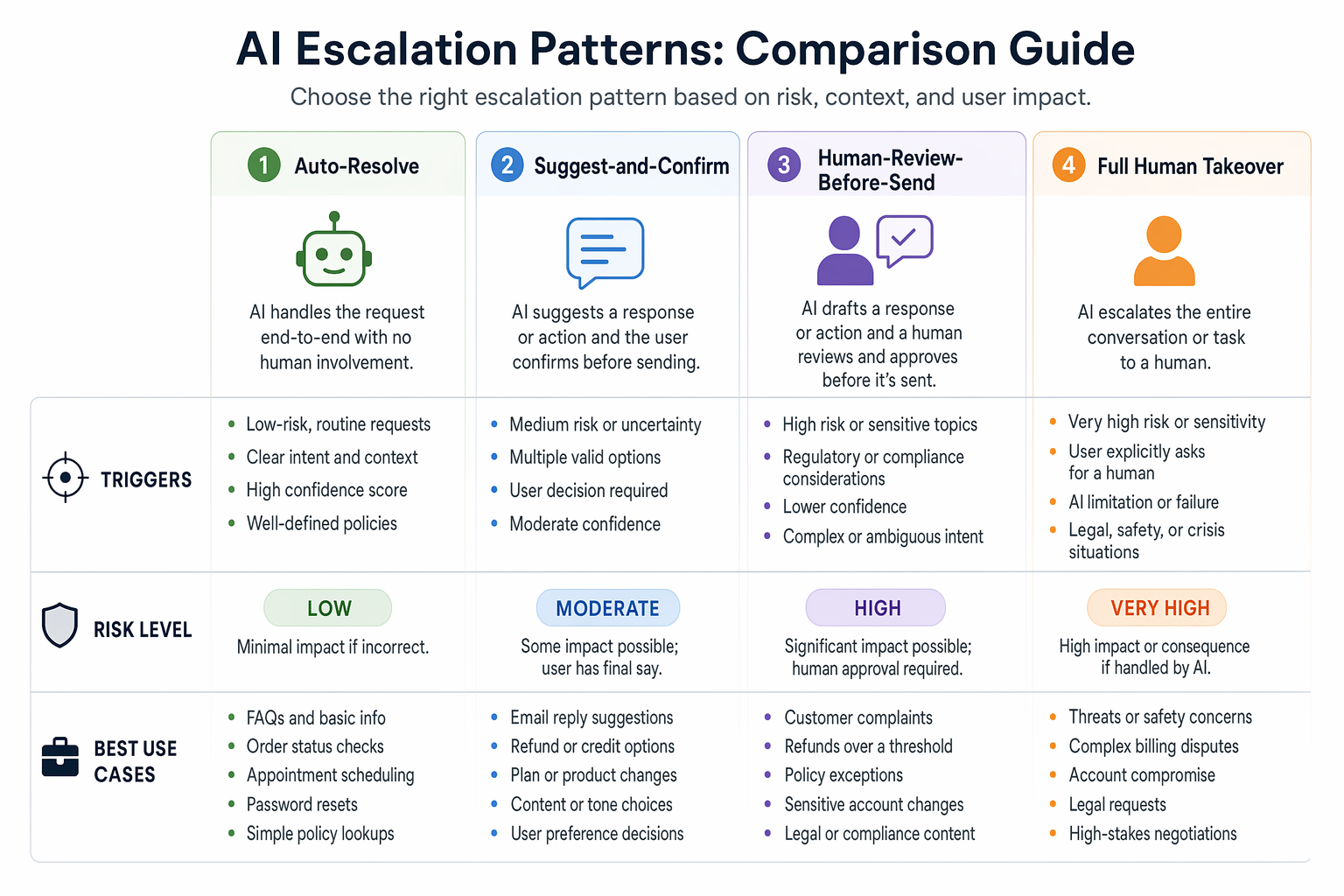
The mistake is not choosing the “wrong” pattern. The mistake is using the same pattern everywhere.
At bytelabs, we have made this tradeoff in real products.
- On Utkrusht.ai, AI-generated outreach could not safely default to auto-send. The better pattern was human-review-before-send because brand voice, personalization quality, and deliverability risks were too important to hand over fully.
- On Harmony.ai, some tool-calling chains could run automatically because the actions were reversible and low-risk. Others needed checkpoints because one bad action could cascade into downstream errors.
- On Surge, where thousands of users depended on real-time data updates, we learned that latency changes user perception immediately. Supabase realtime added 200ms+ latency under load, so we rebuilt the layer using custom Postgres plus Redis pub/sub. That was an engineering decision, but it changed the UX of trust because state changes and takeover signals felt immediate instead of ambiguous.
Here is the blunt rule:
- If the user can easily undo the action, let AI move faster.
- If the action affects money, live users, legal state, or external communication, slow the AI down and add a human checkpoint.
- If the issue is emotionally sensitive or clearly outside the AI’s confidence band, hand it to a human fast.
Counterintuitive take: full automation is often worse than partial automation.
That is true because users value reliable progress over maximum autonomy. An AI that gets 80% done and asks for approval beats an AI that pushes through the last 20% and creates cleanup work.
If you are balancing ambition against speed, this is the same product discipline we talk about in Mvp Design What To Keep And What To Cut. Do less, but make the critical path trustworthy.
How to decide when AI should escalate
Do not escalate based on vibes. Use clear triggers.
The cleanest way to do this is with a decision layer that combines model confidence, business risk, and context completeness.
A practical escalation score can look like this:
const shouldEscalate = ({
  confidence,
  riskLevel,
  missingRequiredFields,
  userSentiment,
  retryCount
}) => {
  if (riskLevel === 'high') return true
  if (missingRequiredFields > 0) return true
  if (userSentiment === 'frustrated' && retryCount >= 1) return true
  if (confidence < 0.72) return true
  return false
}
This is not academic. It gives product, design, and engineering one shared language.
Your escalation triggers should usually include:
- Low confidence on extraction, classification, or answer generation. Pick a threshold and tune it with real logs.
- Missing context required for safe action. If the AI lacks a customer ID, approval state, or policy match, stop.
- User frustration signals. If the same user has rephrased the question twice, stop making them work.
- High-risk action categories. Payments, account changes, compliance workflows, and public-facing sends should escalate by default.
- Repeated tool failure. If downstream systems time out or return conflicting data, the UX should pivot to recovery, not keep retrying invisibly.
The hidden issue is usually not the threshold. It is instrumentation.
You need to log:
- Why escalation happened.
- Whether the user accepted or resisted the handoff.
- Time to human response.
- Whether the human resolved the issue without asking the user to repeat context.
- Whether the issue should have been auto-resolved next time.
This is where engineering and UX meet. If you are shipping AI without observability, your handoff design will stay guesswork. Our post on Llm Observability Slos Drift And Cost Alerts covers the operational side.
Response times under 1 second keep user flow feeling uninterrupted, while longer waits shift attention and increase perceived delay. That matters because escalation often happens right after a delay. If the product pauses, then fails, then offers a human, the handoff feels like collapse. If it quickly detects uncertainty and offers a precise next step, the same handoff feels intentional.
Escalate earlier than you think in high-stakes flows
Founders often resist this because they want the AI to appear more capable.
That is short-term thinking. In high-stakes workflows, early escalation is a trust feature.
For example:
- In an AI drafting tool, a questionable sentence is fixable, so confidence can run lower before escalation.
- In a medical intake or fintech workflow, uncertainty should trigger review early because the downside of a bad action is far higher.
- In customer support, sentiment matters as much as correctness. A technically valid answer can still fail if the user is angry and needs a human signal immediately.
What a good handoff looks like in the product
A good handoff is visible, contextual, and fast. It does not feel like a reset.
Use this sequence.
| Step | What the system does | What the user should see |
|---|---|---|
| Detect uncertainty or risk | Evaluates confidence, missing context, sentiment, and action type | A clear state change instead of a vague spinner |
| Explain the reason | Surfaces one short reason for the handoff | “This needs verification before I proceed” |
| Package context | Sends conversation, extracted fields, tool outputs, and draft work | Confirmation that prior context was preserved |
| Transfer ownership | Assigns a human or queues specialist review | “Alex has your request and will reply in 8 minutes” |
| Continue with fallback progress | Offers edit, save, email summary, or async update | A sense that the task is still moving |
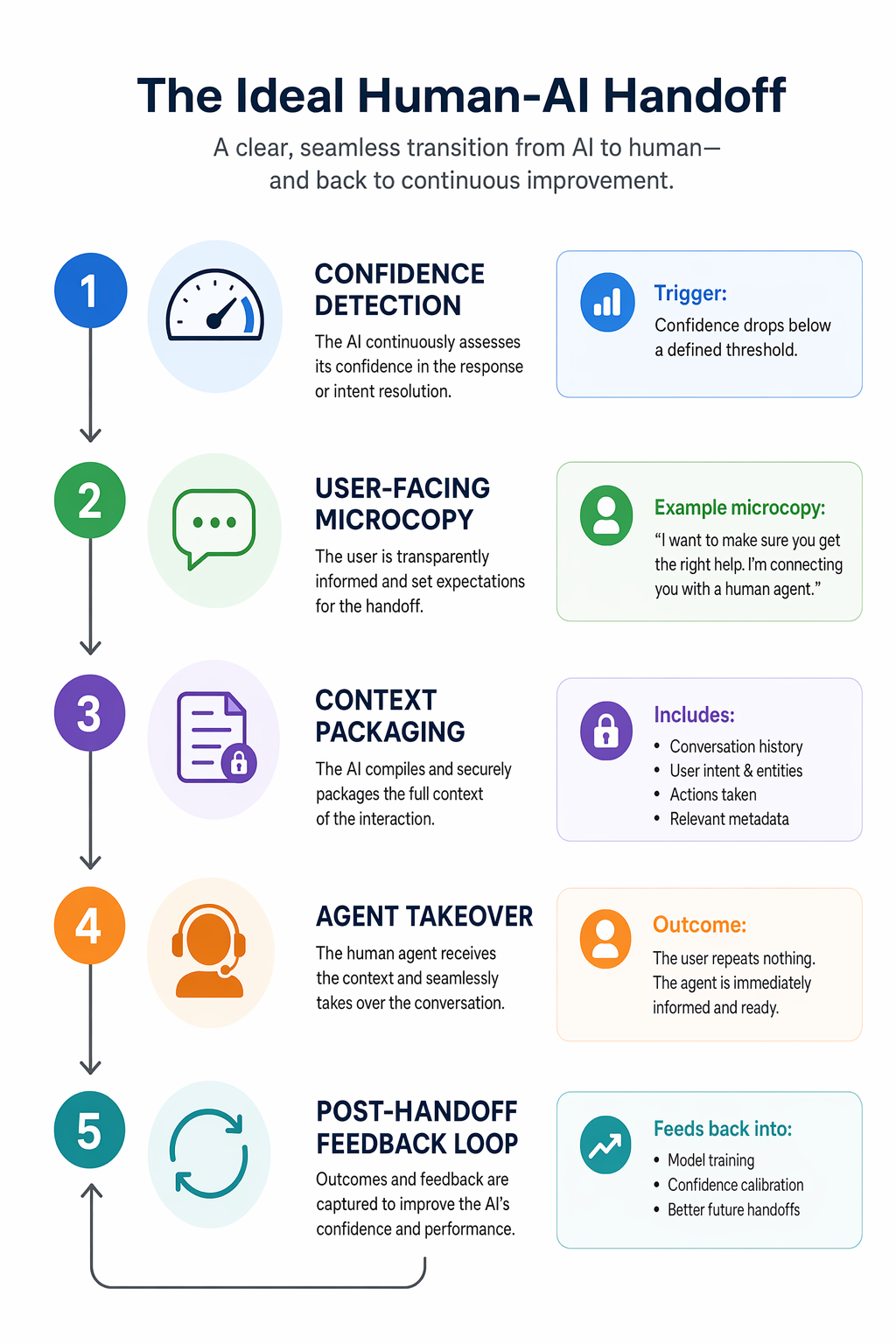
That sequence works across products because it respects user effort.
Here is an example of handoff microcopy that is actually useful:
- “I’m not confident enough to change your billing settings automatically.”
- “I’ve prepared the update request and attached your account details.”
- “A support specialist is reviewing it now. Expected reply: 7 minutes.”
- “You can keep browsing — we’ll notify you here and by email.”
That is strong because it combines limitation, preservation, expectation, and continuity.
Here is a weak version:
- “Sorry, something went wrong. Please contact support.”
That line throws away all the work and pushes effort back onto the user. It is lazy UX.
Mobile needs even tighter handoffs
On mobile, handoff friction gets worse because attention is fragmented and screen space is limited.
Use these mobile-specific rules:
- Collapse status into one high-signal card instead of scattering updates across modals, toasts, and chat bubbles.
- Keep the human takeover CTA thumb-reachable and persistent if the task is blocked.
- Save drafts and partial context automatically because users will background the app mid-flow.
- Use push notifications carefully. Notify on ownership transfer and completion, not on every internal state change.
This is consistent with the mobile UX patterns we lean on in product work. If the handoff is happening on mobile, the guidance in Mobile App Onboarding Best Practices That Convert applies here too: reduce cognitive load, preserve momentum, and never make users repeat themselves.
Design the agent-side view too
Founders usually overdesign the user-facing AI and underdesign the human-facing takeover screen.
That is a mistake. If the support agent, operator, or reviewer opens a messy queue with no summary, the handoff has already failed.
The human-side panel should include:
- A one-line AI summary that is editable, not locked.
- Extracted structured fields like account ID, order value, sentiment, and task type.
- The exact trigger for escalation, so the human knows why they are involved.
- The AI draft or attempted solution, so the human can refine instead of restart.
- A recommended next action, which the human can accept, edit, or reject.
This is the same principle as good design-to-dev handoff: the transfer works only when the receiver gets enough context to act immediately.
What to do next
Audit one AI flow this week and map its handoff in five steps: trigger, explanation, context packaging, ownership transfer, and fallback progress.
Do not start by improving the model. Start by finding the exact moment where the user loses momentum, then redesign that moment so the AI either proceeds confidently or escalates cleanly.
If you need a concrete place to begin, pick one high-risk workflow and implement this minimum version:
- Add a visible confidence or status state instead of a generic loading message.
- Add one sentence explaining why escalation is happening.
- Preserve the full conversation and any structured inputs automatically.
- Show who owns the task next and when the user will hear back.
- Log the escalation reason so you can tune the threshold later.
That one pass will improve trust more than another round of prompt tweaking.
If you're at this stage, schedule a call with us.